AI that helps operators decide—not a black box that acts alone
Orqit AI surfaces fleet risk, answers operational questions, suggests ticket routing, and drafts workflow ideas—grounded in your tenant data, with humans confirming remediations.
- Operations Center AI Intelligence
- Ask about your fleet
- In-app assistant
- Ticket classification hints
Orqit AI is decision support across Operations Center and the service platform: AI Intelligence for the fleet, Ask about your fleet, an in-app assistant for tickets and knowledge, ticket classification suggestions, and natural-language drafts for visual workflows—not unsupervised remediations.
Who this is for
- IT Operations and endpoint teams prioritizing fleet risk
- Helpdesk agents needing faster context and routing hints
- IT managers who want estate-level AI summaries without another console
- Automation owners drafting workflows from natural language
Problems we address
-
Alert and signal overload Critical devices and patch gaps hide inside volume until users complain.
-
Slow context gathering Operators jump across tools to answer “which devices are at risk?”
-
Inconsistent triage Ticket category and priority vary by agent without shared suggestions.
-
Automation is hard to start Teams know the process but struggle to turn it into a first workflow draft.
How Orqit approaches this
Organizations drown in alerts, tickets, and dashboards. Orqit AI helps teams prioritize which devices need attention, ask natural-language questions about the estate, get routing hints on tickets, and draft automations—while change control and remote actions stay human-confirmed.
Platform capabilities
How Orqit AI helps IT organizations move from noise to action.
Operations Center AI Intelligence
Predicted failures, anomalies, RCA clusters, recommendations, and fleet narrative in Overview → AI Intelligence.
Ask about your fleet
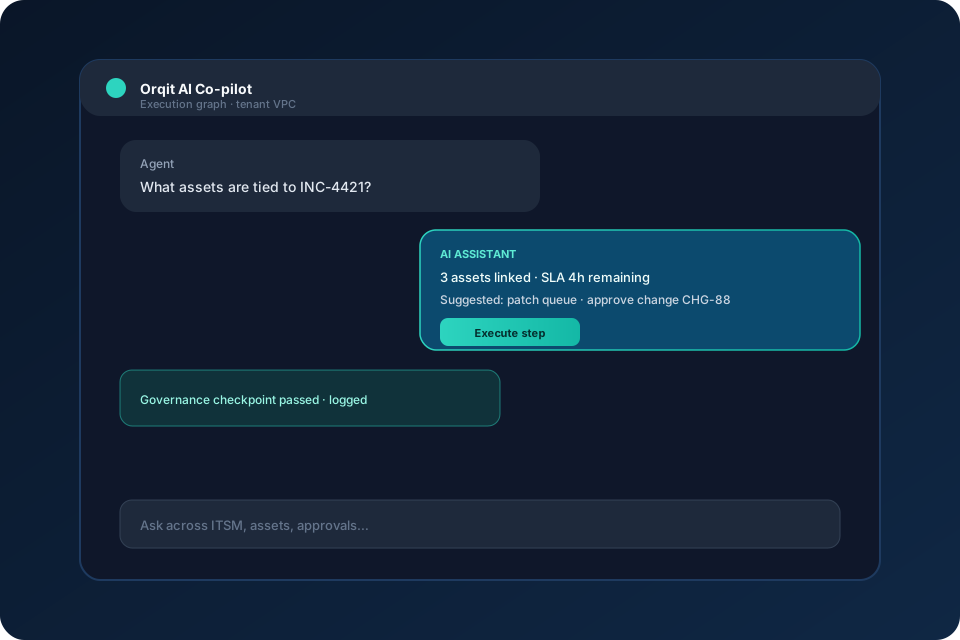
Natural-language questions answered from estate telemetry and risk signals first.
In-app assistant
FAQ, knowledge, and operational context with proposed actions that require confirmation.
Ticket classification hints
Suggested category, priority, and group to speed consistent triage.
NL → workflow drafts
Turn a plain-language process description into a visual-flow draft to review and edit.
Confirm-before-act
Recommendations and assistant proposals do not auto-execute privileged remediations.
How it works in practice
-
1
See risk
Open AI Intelligence to review predicted failures, anomalies, and devices needing attention.
-
2
Ask
Use Ask about your fleet or the in-app assistant to clarify risk, posture, or related work.
-
3
Investigate
Drill into Device Console, Timeline, or tickets with shared context—not a separate AI silo.
-
4
Act with confirmation
Accept or dismiss recommendations; run remote or service actions under normal permissions and change control.
Results teams care about
Faster prioritization
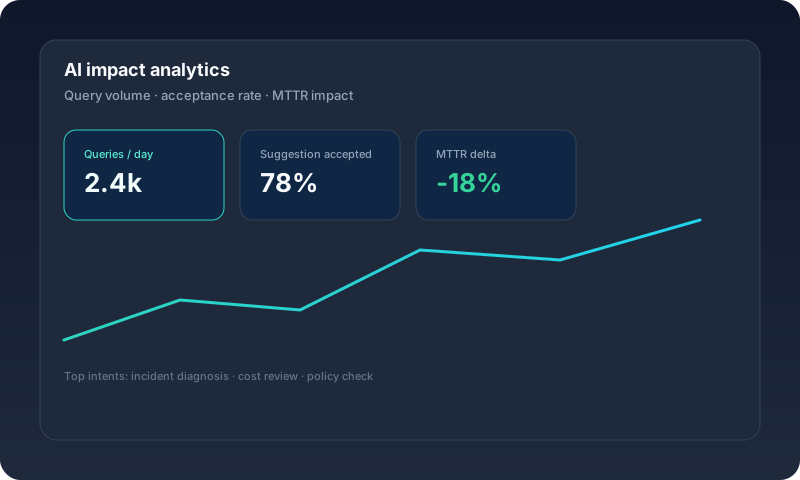
Attention shifts to predicted failures, anomalies, and recommendation queues instead of raw noise.
Less swivel-chair research
Natural-language fleet and service questions reduce hunting across consoles.
More consistent triage
Classification hints help agents route work similarly across shifts.
AI inside the operations platform
Fleet AI and service assistant live beside ITSM, ITAM, and Operations Center—not a bolt-on chatbot.
Where teams apply this
Prioritize failing endpoints
Use predicted failures and patch/compliance-linked RCA clusters to pick today’s work.
Helpdesk acceleration
Ask for device risk context, then open Device Console or create a ticket with confirmation.
Posture and compliance questions
Ask which devices show low patch or security posture before audits or campaigns.
Draft an automation
Describe an approval or fulfillment path in natural language and edit the generated visual-flow draft.
Built for audit and least-privilege
- Privileged remediations and remote jobs require permissions and operator confirmation.
- AI recommendations can be accepted or dismissed; they are not auto-executed.
- Optional LLM providers are configuration-dependent—do not assume external model use in every deployment.
Co-pilot within your guardrails
AI Intelligence summarizes predicted failures, anomalies, RCA clusters, and recommendations. Ask about your fleet answers risk and posture questions from telemetry first. The in-app assistant can search FAQ/KB and propose actions such as creating a ticket. Optional LLM providers may narrate or draft; they do not replace tenant permissions or approval gates.
Operational visibility
AI Intelligence shows fleet health narrative, predicted failures, anomalies, root-cause clusters, recommendations, and Ask about your fleet—so leaders and operators see where to investigate next.
In depth
How Orqit AI helps organizations
IT organizations do not need another chatbot that cannot see the estate. They need AI that prioritizes risk, answers operational questions, and suggests next steps inside the same platform as tickets, assets, and endpoints.
Orqit AI is built for that loop:
- See — AI Intelligence highlights predicted failures, anomalies, and devices needing attention
- Ask — Ask about your fleet and the in-app assistant clarify risk and context
- Investigate — Drill into Operations Center Device Console, Compliance, or ITSM work
- Act — Operators confirm remote or service actions under normal controls
See AI Intelligence in product

AI Intelligence shows:
- Fleet health narrative (for example average health and endpoints needing attention)
- Predicted failures with confidence-oriented signals (such as patch failure or instability)
- Anomalies and RCA clusters that group related signals (disk, network, patch posture)
- Recommendations to review, accept, or dismiss
- Ask about your fleet for questions like “which devices are at risk?”

Overview remains the Monitor surface; AI Intelligence sits beside it so prediction and Q&A stay connected to the same estate KPIs.

When AI points at a device, operators investigate in Device Console—then use Remote only when they choose to act.

Compliance and patch posture feed the same operational picture AI summarizes—so recommendations stay tied to measurable estate rules.

Remote tools execute after a human decision. AI helps you choose *what* to fix; operators control *how* and *when*.
Where AI shows up in Orqit
| Area | How it helps |
|---|---|
| Operations Center AI Intelligence | Prioritize predicted failures, anomalies, RCA clusters, and recommendations |
| Ask about your fleet | Answer estate risk and posture questions in natural language |
| In-app assistant | FAQ/KB and operational context with confirmable action proposals |
| Ticket classification | Suggest category, priority, and group for more consistent triage |
| Workflow drafts | Turn a plain-language process into a visual-flow draft to edit |
What Orqit AI does not claim
- Auto-remediation of devices without operator confirmation
- Proprietary Orqit LLM fine-tuned in a private VPC with “no external transmission” as a universal guarantee
- Self-optimizing AI decision nodes or nightly model retraining
- Replacing change control, CAB, or security review
Who benefits
- Endpoint / IT Ops — clearer daily priority from predicted failures and anomalies
- Helpdesk — faster context and triage hints
- IT leadership — estate-level AI summaries without a separate analytics product
- Automation owners — faster first drafts of visual workflows
Related products
- Operations Center — Monitor → Investigate → Act for the fleet
- IT Service Management — tickets and service workflows
- Workflow Automation — review and run drafted flows
- Pricing — plan positioning for platform capabilities
Common questions
What is Orqit AI?
Orqit AI is the set of decision-support capabilities in Orqit: Operations Center AI Intelligence, Ask about your fleet, the in-app assistant, ticket classification suggestions, and natural-language workflow drafts.
How does AI Intelligence help organizations?
It summarizes fleet health, surfaces predicted failures and anomalies, groups related issues into RCA clusters, and lists recommendations so teams know what to investigate and fix first.
Does Orqit AI automatically remediate devices?
No. Recommendations and assistant proposals are decision support. Remote scripts, commands, restarts, and other privileged actions require operator confirmation and permissions.
Where do I find AI Intelligence?
In Operations Center Overview, open the AI Intelligence tab (/device-analytics?mode=ai).
Does Ask about your fleet use only marketing language?
Ask is grounded in estate telemetry and risk signals first. Optional LLM narration may enrich answers when configured; it is not a substitute for investigating Device Console or Compliance.
Is Orqit training a private model on our data in a proprietary VPC LLM?
Orqit does not claim a proprietary fine-tuned Orqit LLM isolated in your VPC. Optional providers (when configured) may be used for narration or drafts under your deployment settings and permissions.
How does AI help the service desk?
Agents can use the in-app assistant for FAQ/KB and operational context, and ticket classification can suggest category, priority, and group to speed triage.
Can AI build workflows for us?
You can describe a process in natural language to generate a visual-flow draft. You review and edit the draft before it becomes production automation—there is no claim of self-optimizing AI decision nodes.
Ready to modernize IT operations?
Launch a pilot workspace or book a walkthrough — with estimated seat savings versus legacy suites, plus 24/7 support.